The most effective way to read a research paper quickly is to evaluate the title and abstract before doing a quick visual check of the figures and tables. If the research paper is relevant to your topic, then use targeted reading and the topic sentence rule to speed read the right sections and extract the information that you need. You can also find more related and relevant journal articles by forward and backward citation mining.
You don’t need to read every word of a research paper. In fact, if you’re trying to find information for an assignment, reading every paper from beginning to end is one of the slowest ways to research (and fastest ways to fall asleep).
The goal isn’t to read more. It’s to find the information you need faster.

Hi, if you don’t know me, I’m Dr Theresa Orr.
You’re welcome to learn more about how I help students succeed at university with my Uni Pro Accelerator Course.
This guide shows you how to quickly decide whether a paper is worth your time, and then only read the sections and paragraphs that contain the information you need. This is the process I use when reading research papers. Over the years, I’ve had to evaluate hundreds, if not thousands, of journal articles while doing research and publishing peer-reviewed papers.
You can also watch my video on how to read a research paper, which includes worked examples:
Step 1: Start with the title and abstract
When you start researching, the first thing you want to know is whether the paper is even worth reading.
Start with the title.
A good title should give you some indication of:
- the topic
- the population or study group
- the location
- the main focus of the paper
- and sometimes even the method
Sometimes the title alone is enough to rule a paper out. For example, if you’re researching adults but the paper is specifically about children, it may not be useful to you.
Unfortunately though, a title is rarely enough to decide whether a paper is going to be worth your time or not. So, if the title still looks relevant, move on to the abstract.
How to read an abstract quickly
An abstract is a short summary of the entire paper. Most abstracts follow a similar structure:
- Background: Why the topic matters
- Methods: What the researchers did
- Results: What they found
- Conclusion: What those findings mean and why they matter
You don’t necessarily need to read every sentence of the abstract.
Start with the first one or two sentences and then the last one or two sentences.
- The beginning usually tells you what the paper is about and why the topic matters.
- The end usually gives you the main finding or conclusion.
Those two parts are often enough to decide whether that particular journal article is going to be relevant for your research.
If the abstract doesn’t contain anything relevant to your research question, move on. Don’t fall into the trap of reading a paper just because you’ve already downloaded it.
💡Tip
If you’re doing a literature review, then the middle sentences of the abstract can be especially useful because they usually cover the methods and results:
- Methods: Check whether the paper used a methodology you need for your review.
- Results: Check whether the paper contains data you can extract and compare with other studies.
Step 2: Do a quick visual check
If the abstract looks promising, do a quick visual check of the paper.
Scroll through and look at:
- tables
- graphs
- figures
- diagrams
This should take less than a minute. You’re not trying to understand or analyse the entire figure. You’re just checking whether the paper looks like it contains information that could be useful.
A table might contain the exact data you’re looking for, or a figure might show a relationship or trend that isn’t obvious from the abstract.
This is also useful when you’re unsure whether the paper is worth reading in more detail. The abstract may look promising, but the figures and tables can help confirm whether there is enough useful information to bother reading the article at all.
Step 3: Choose the section you actually need
FREE ASSIGNMENT GUIDE
Developed by Dr Theresa Orr.
You’re very welcome!
Once you’ve decided the paper is relevant, whatever you do, don’t automatically start at the introduction and read the whole thing.
Reading a journal article is a skill. As a general rule, researchers don’t read every word, or even every section. Instead, the idea is to read the parts that have what you need in them. That means jumping directly to the section that is most likely to contain the information you need.
Read the introduction when you need background information
Go to the introduction if you want to understand:
- what the topic means
- why it matters
- what previous research has found
- how the topic fits into a broader area
- what the knowledge gaps are in the research area
The introduction is usually the best place to find background information, including great explanations of basic topics or concepts in a given area.
Read the discussion when you need to understand the findings
Go to the discussion if you want to know:
- what a study’s results mean
- why their findings matter
- how their findings compare with previous studies
- what the implications might be
The discussion is usually far more useful than the results section. The discussion section explains what the findings are in words, whereas the results section is just the numbers without an explanation. So, if you’re trying to understand what the study actually found or how it relates to what you found in your study, then the discussion is the place to start.
Read the methods when you need to know how something was done
Go to the methods section if you want to know:
- how the study was designed
- how data were collected
- what equipment or procedures were used
- how a particular method works
This can be especially useful when you’re comparing research methods or planning your own study.
What about the results section?
In many cases, you won’t need to read the results section at all. The results section contains the raw numbers, statistical tests and specific outcomes from that study.
If you’re looking for general information or trying to understand what the study means, the discussion is more useful.
But, as always, there are exceptions.
For example, if you’re doing a literature review and need specific data points from several studies, then the results section may have exactly what you need.
You can find my complete research guide in the Uni Pro Accelerator, including how to extract the information you need and organise it to make the writing process easier.
💡Tip
If you need to extract data from papers to build a table, graph, or comparison for your literature review, check whether the paper has supplementary information, supplementary materials or supplementary data.
These files often contain much more data than you’ll find in the main paper. Look for a link in the journal article PDF, usually near the end of the paper or alongside the online article.
Step 4: Use the topic sentence rule
Once you’re in the right section, you still don’t need to read every paragraph.
Use the topic sentence rule.
The first sentence of an academic paragraph should always tell you what the rest of the paragraph is about. So instead of reading every paragraph in full, read the first sentence first.
- If it isn’t relevant to your topic, skip the paragraph.
- If it is relevant, then read the rest.
- If you’re not sure if it will be relevant, then skim read it to spot helpful keywords to you.
Example
Imagine you’re looking for information about paleosols, these are ancient soils. You read the first sentence of a paragraph, which says:
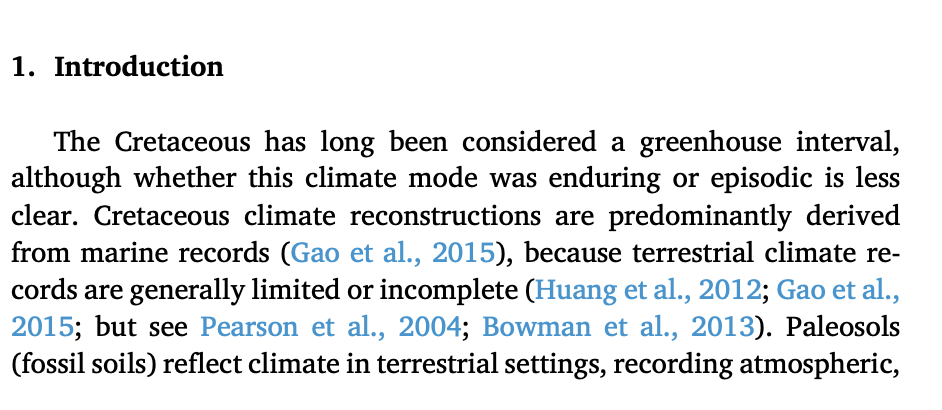
It talks about the Cretaceous period and climate, and it doesn’t mention paleosols. Skip it and move on to the next paragraph, which could be:

The next paragraph begins with “Recent paleosol research…”, so straight away you know that paragraph is probably relevant. Read it.
Then move to the next paragraph and repeat the process.
This lets you scan a long section very quickly without getting stuck reading information you don’t need.
Step 5: Use citation mining to find more research
Once you’ve finished reading a relevant and useful research paper, you can use it to find more.
This is called citation mining.
There are two main ways to do it:
- backward citation mining
- forward citation mining
Backward citation mining
Backward citation mining means looking at the papers that your useful paper has cited.
For example, imagine you find a sentence that gives you exactly the information you need. Look at the citation attached to that sentence. There’s a high chance that the source being cited contains even more information about that topic.
Go to the reference list, find that research paper, and evaluate it using the same process:
- Evaluate the title and abstract to decide whether the paper is worth your time.
- Check the figures and tables for useful information.
- Go directly to the section you need.
- Use the topic sentence rule to decide which paragraphs to read.
- Use forward and backward citation mining to find more relevant research.
You can then move backwards through the research.
Forward citation mining
Forward citation mining does the opposite. Instead of looking at older papers cited by your article, you look at newer papers that have cited it.
Google Scholar makes this easy.
- Search for the paper in Google Scholar and look for the Cited by link underneath it.
- Clicking that will show you all the papers that have cited the article since it was published.
Those newer papers may contain updated research on the same topic.
💡Tip
Look for literature reviews!
If you can find a literature review that closely matches your topic, it can save you a huge amount of time.
A literature review brings together all the research that has been published on a particular topic. That means its reference list can contain dozens, or even hundreds, of relevant sources.
You can use the literature review to identify the important earlier studies, then search for newer papers published after the review.
This is so much faster than trying to find every useful paper individually. It’s literally a gold mine of information.
So, when you find a relevant literature review, check its publication date. Use it to find the important research published before that date, then search separately for newer studies published afterwards.
Avoid the research rabbit hole
Citation mining is useful, but it can also become a trap.
- You open one paper.
- That leads to another.
- Then another.
- Then another.
Twenty minutes later, you have 15 tabs open and can’t remember what you were originally looking for. I know, because I’ve done it too.
The best way to avoid this is to work systematically:
- Finish evaluating one paper before moving to the next.
- Extract the information you need.
- Record the useful citations.
- Then move through those papers one at a time.
Don’t keep following links endlessly.
💡Tip
Keep a running research spreadsheet
As you pull useful information from each paper, add it to a simple spreadsheet straight away.
Include:
- the key information or data you extracted
- the full citation
- the paper title
- the page, table or figure it came from
This makes it much easier to keep track of your research and stops you having to reopen papers later to work out where a piece of information came from.
Before you start your next assignment, consider this…
Knowing exactly what the question is asking can save you hours of unnecessary research and writing.
I’ve put together the process I teach to break assignment instructions down step by step.
And you can get it for FREE below.
FREE ASSIGNMENT GUIDE
Developed by Dr Theresa Orr.
You’re very welcome!